Life Worth Living Goals
Define, visualize, and track your long-term life aspirations and values with an innovative visual "road" metaphor that shows your journey toward meaningful living.
What are Life Worth Living Goals?
In DBT, creating a "Life Worth Living" is a core principle. These goals help you identify what matters most to you and give your therapeutic work direction and purpose. Bifocal's LWL Goals feature displays your aspirations as nodes along a flowing road, creating a visual reminder of your journey toward the life you want to build.
Accessing Your Goals
- Open Bifocal and navigate to the Journal section
- Tap the menu icon in the top-left toolbar
- Select "Your Goals" from the dropdown menu
The menu provides quick switching between Journal, Your Goals, and Cope-Aheads.

Understanding the Road Visualization
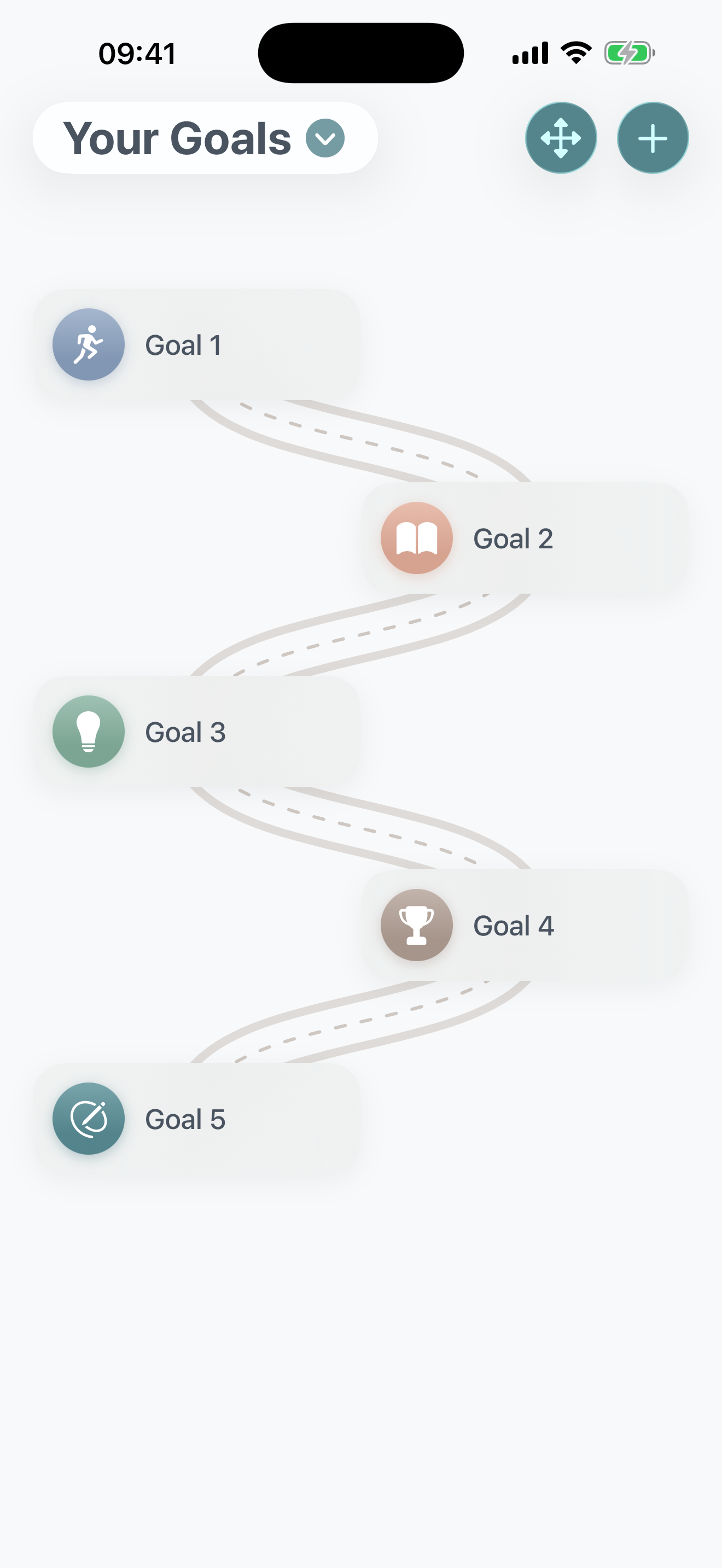
Your goals are displayed using a unique visual metaphor:
- The Road: A flowing, winding path with realistic road features
- Road Border: Darker brown edges define the path boundaries
- Pavement: A lighter-colored road surface
- Center Stitching: Dotted white lines down the middle
- Goal Cards: Circular cards positioned alternately left and right along the road
Goals are spaced evenly down the page, creating a journey you can visually follow from top to bottom.
Creating a New Goal
To add a Life Worth Living Goal:
- Tap the "+" button in the toolbar
- Complete the four-step creation wizard:
📱 Free vs Pro
Free: Create up to 3 Life Worth Living Goals
Bifocal Pro: Create unlimited goals to fully map out your aspirations
The Four-Step Goal Creation Process
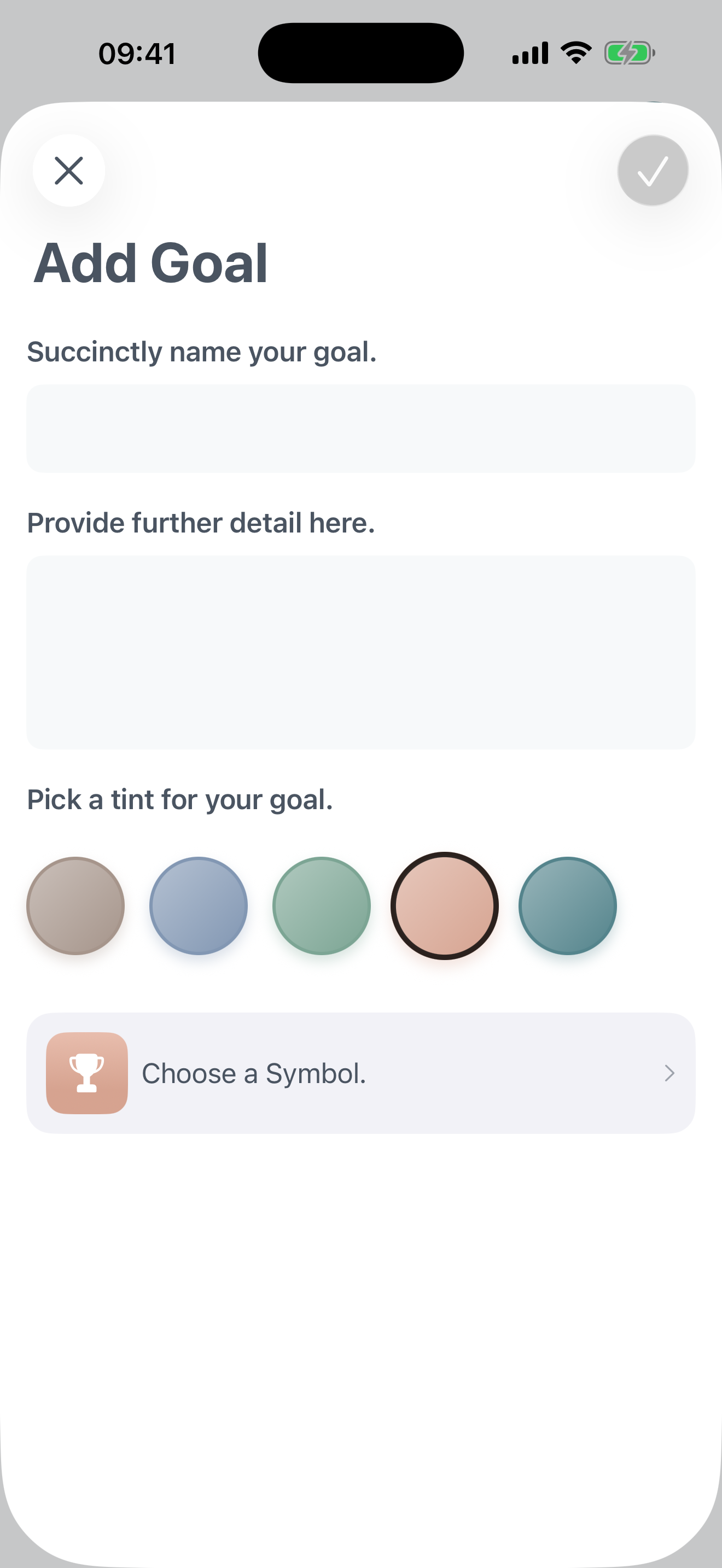
Building a meaningful goal takes just four simple steps:
Name Your Goal
Prompt: "Succinctly name your goal."
Enter a short, memorable title for your goal (maximum 30 characters). This name will appear on the goal card in your road view.
Examples: "Complete my degree," "Build stronger friendships," "Regular exercise habit"
Add Details
Prompt: "Provide further detail here."
Expand on what this goal means to you. Explain why it matters, what achieving it would look like, or what specific actions you plan to take.
This extended description helps you clarify your intentions and provides context when reviewing your goals later.
Pick a Color
Prompt: "Pick a tint for your goal."
Choose from a palette of vibrant colors to represent your goal visually. The selected color will:
- Fill the icon circle on your goal card
- Create a gradient background effect
- Help you quickly identify goals at a glance
Tap a color circle to select it—you'll see a checkmark and scale animation when selected.
Choose an Icon
Prompt: Tap the icon button to open the picker
Select an SF Symbol icon that best represents your goal. Choose from 30 icons organized by category:
- Achievement: Star, target, flag, trophy, medal
- Health/Wellness: Running figure, meditation, heart, pills, bed
- Learning: Book, graduation cap, pencil, brain, lightbulb
- Finance: Banknote, credit card, shopping cart, bag, chart
- Social: People, conversation bubbles, house
- Travel/Activities: Airplane, car, leaf, water drop
- Nature/Time: Sun, moon and stars, flame
The icon displays in white on your chosen color background.
✅ Saving Your Goal
The save button only becomes active when you've completed all required fields:
- Title entered and under 30 characters
- Details text provided
Once saved, your goal immediately appears on the road visualization!
Viewing Goal Details
To see the full information about any goal:
- Tap on any goal card in the road view
- A detail sheet opens displaying:
- Large circular icon (100x100pt) with gradient background in your chosen color
- Goal title in bold
- "About this Goal" section with your full details text
- Swipe down or tap outside to dismiss

Reordering Your Goals
Change the sequence of goals along your road:
- Tap the reorder icon (four-direction arrow) in the toolbar
- A list view appears showing all your goals with drag handles
- Press and hold the drag handle on the right side of any goal
- Drag the goal up or down to reposition it
- Release to set the new order
- Changes save automatically
Use this to prioritize goals, group related aspirations, or arrange them in a meaningful sequence.

Deleting Goals
There are two ways to remove a goal:
Method 1: From the Road View
- Long-press on the goal card you want to delete
- Select "Delete Goal" from the context menu (trash icon)
- Confirm: "Are you sure you want to delete this goal? This action cannot be undone."
Method 2: From the Detail View
- Tap the goal to open its detail sheet
- Tap the trash icon in the top-left toolbar
- Confirm the deletion
Getting Started from Empty
When you first access Your Goals, you'll see an empty road with the message:
"Get started with creating your Life Worth Living Goals with the '+' button."
This gentle prompt encourages you to begin defining what matters most in your life. Don't worry about getting it "perfect"—goals can evolve as you grow in therapy.
Tips for Defining Meaningful Goals
Think Beyond Symptoms
LWL Goals aren't just about managing illness—they're about what you want to build, experience, and become. Focus on positive aspirations, not just problem reduction.
Make Them Personal
Your goals should reflect your values, not what others expect of you. What would make your life feel meaningful to you?
Be Specific in the Details
While the title is short, use the details field to clarify what success looks like. "Better relationships" becomes meaningful when you define what "better" means.
Goals Can Change
It's okay to delete goals that no longer resonate or add new ones as you grow. Your road is meant to evolve with you.
Discuss with Your Therapist
Share your LWL Goals in therapy sessions. They provide a framework for treatment planning and help ensure your therapeutic work aligns with what matters to you.
Use Visual Cues Intentionally
Choose colors and icons that inspire you. Seeing your goals visualized on the road can provide daily motivation and remind you why you're doing this work.
Why Life Worth Living Goals Matter
🎯 Direction
Goals give your therapeutic work a destination. Instead of just managing crises, you're building toward something meaningful.
🔥 Motivation
When DBT skills practice feels hard, your LWL Goals remind you why the effort matters. They connect daily work to long-term aspirations.
📊 Progress Tracking
Revisiting your goals over time helps you see growth. What once felt impossible may become achievable as you develop skills and resilience.
🧭 Decision Making
When facing choices, ask: "Does this move me closer to my LWL Goals?" Your goals become a compass for daily decisions.
Your Privacy and Data
🔒 Secure Storage
All goals are stored locally on your device and in your encrypted iCloud (if enabled). Bifocal cannot access your goals.
📱 Personal and Private
Your Life Worth Living Goals are for you. Share them with your therapist or loved ones if you choose, but they remain entirely under your control.
🗑️ Full Control
Delete individual goals at any time, or wipe all goal data from Data Management settings.